Thank you very much for agreeing to this interview, Rhoda Orme-Johnson!
Rhoda Orme-Johnson is an author, was a computer programmer for the Apollo Project, a teacher of TM, and a professor among other interesting things.
Q: According to the blurb on the back of your book, Anna: An Immigrant Story you are a writer, always a writer. If you had to describe yourself in one word, would writer be the word?
A: “Seeker” is the word. My whole life has been a search for spiritual progress, development of consciousness, and deep knowledge about how mind and body work for optimum growth, hence my interest in the Transcendental Meditation technique. Writing itself is a process of self-discovery, so very much in this life-learning program. Writing comes from the deepest level of consciousness and leads the writer back there to mine one’s deepest feelings and thoughts. It’s also very blissful.
Q: You have traveled a great deal. Where in the world do you feel most at home?
A: I love traveling the world and enjoying various cultures, cuisines, and beauties, spiritual and material. I felt very at home in India, but with the feeling that my past lives there may not have been very pleasant. Paris is the place where I am most alive, happy, and full of the zest of life!
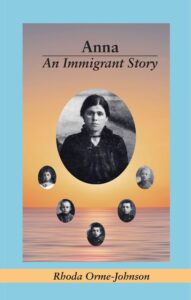
Q: Where did you get the idea to write your grandmother’s story? Many immigrants to America would rather put the past before they came to this country behind them. It is good that you wrote of her history so we can know the history of people that struggled to get here.
A: I was meditating one day and I felt my grandmother’s presence and felt her desire that I tell her story. That impulse got me started on a big research project to find out what really happened. She and my parents’ generation had all died, but many of my cousins had diaries, letters, memories, and photos that allowed me to reconstruct her life. Some of it was painful, like imagining living under the Russian occupation of Ukraine, where she and my mother and all her brothers were born.
Q: Do you share any qualities with your grandmother? It seems she was very determined, along with her husband, to create a better life for her family. Can you share with us an example of her determination?
A: My grandfather left Ukraine for America in 1913, just after my mother’s birth, leaving my grandmother with five children to care for. He promised to send for her within the year, but World War I intervened, as did the revolutions in Russia, a cholera epidemic, and much more, while he sold vegetables from a cart, saved money, and bought the family a house to live in when they could finally get out of Ukraine. The Russians took away her second house (and source of income) and left her with her garden, canning, and other methods to feed the family as the years went by. Finally, in 1923 the money and opportunity allowed her to take four of the children first to Kiev, then to Moscow (to get papers and tickets), and on to Latvia to get a ship to America. Reunited with my grandfather, she adapted to a strange country, raised her extended family, and lived through the 20th century in her home, via radio and news, until her death in 1956 (when I was 16 years old). I find that I too, prioritized my family, learned to live by my own wits and work, and fully entered into the life and times in which I found my self. I recreated her life through a memoir, in which she lives her old age, remembers her past, and evaluates her life and times. People tell me it is a good read!
Q: You have been a member of PaperBackSwap for 6 years, how did you first learn of the site?
A: I don’t remember who first told me about the site, but it has been great fun to wish list the books I would love to read and to share those I have already read with people who want to enjoy them.
Q: Do you read for pleasure or to learn?
Both. Although I mostly read fiction, I always learn vicariously from the characters and what they go through. I learn about myself, of course, and I must say, I prefer fiction that shows the evolution and growth of its characters, not their misery and downfall, because I believe life has a positive trajectory, not always obvious up close, but evident in the long term.
Q: Who is your favorite author?
A: Well, of romance writers, Mary Balogh. Of literature greats, I have always loved Willa Cather. Recently I have really enjoyed Ann Patchett’s latest Tom Lake. I read David Copperfield before tackling my book club’s choice of Demon Copperhead, and found I infinitely preferred the former.
Q: What was your favorite book growing up?
A: As a child, I loved books about horses and dogs and the Dr. Dolittle books, then girls (remember Betsy, Tacy and Tib?). I remember really loving A Tree Grows in Brooklyn. Then I moved on to the “great books” shelf in my local library, found Dostoevsky, Tolstoy, Flaubert, and off I went. Now, I must say, I prefer books written by women, not by men. Let’s have the inside story! (Although I did love A Gentleman in Moscow.)
Q: Who is your hero, living or dead?
A: Most recently, Elizabeth Zott in Lessons in Chemistry. What a great read!
And now for some fun stuff:
Q: Coke or Pepsi?
A: Neither. These are poisons. Water is best. I do love good Chinese or Indian tea (Pu-er) to start the day.
Q: Cats or Dogs?
A: I am a cat person, although I have had and do love dogs, especially if they belong to someone else and I can just enjoy them and then send them home.
Q: Breakfast or lunch?
A: I could eat breakfast all day long.
Q: Winter or summer?
A: Both have their joys, but eating out on the porch in the warm weather and strolling down to the beach are best.
Q: Do you have another book planned?
A: Things run through my head, but I am now 83, and travel has taken precedence, and reading, always reading. I am thinking of revisiting the great women writers of the 19th century: George Eliot, for example.
Q: Is there anything else you would like our readers to know?
I am feeling closer to Mother/Father God these days (New avenues of learning opening up), although organized religion continues to give me the hives; I will have nothing to do with it. No one should have spiritual power over anyone else and take advantage of it.
Rhoda Orme-Johnson has generously offered a copy of her book, Anna. An Immigrant Story, to one of our members who comments here on this PaperBackSwap Blog interview. A winner will be chosen at random.